 University of North Texas

For students who have alternative format as an approved accommodation, we convert textbooks and course materials into e-text, audio, or Braille, based on their disability-related need. In order for us to get started on your alternative format request, please complete your request in AIM. To do so, you will need to first request this on your accommodation letter. To request your letters of accommodation, please follow this link: Request my Letter of Accommodation
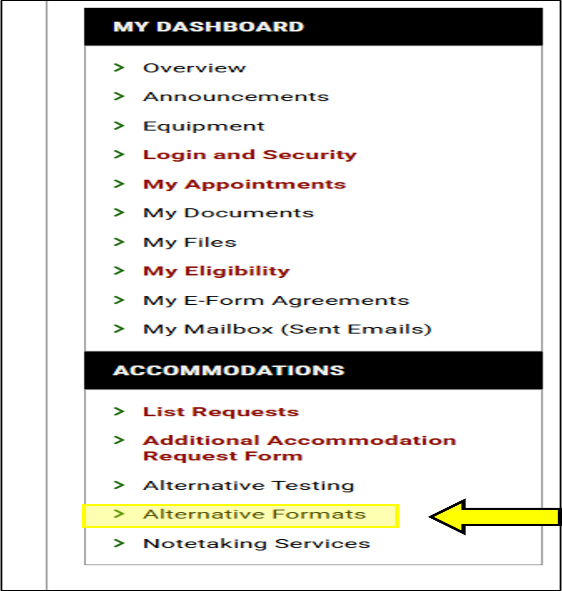
After you have requested your accommodations for the semester, you will then need to go request your alternative format (books and/or required course materials). You can continue to add materials and books throughout the semester as you learn you will need them. On the left-hand side when you log into AIM, you will click Alternative Format.
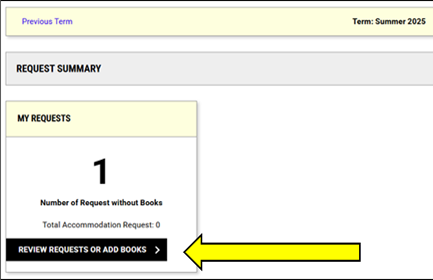
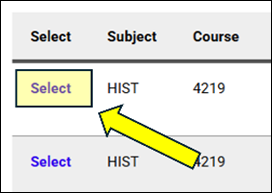
In the center of the screen you will see “Request Alternative Formats for” (the given semester). You will then need to click the books that you would like to request. Click “Select” next to the book that you would like to request. These books will be uploaded from the UNT Barnes and Noble bookstore website.
You can then upload the receipt here too!
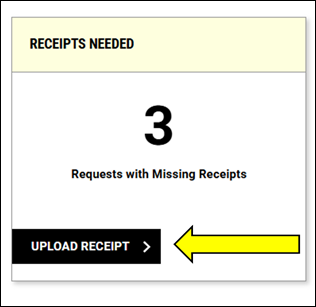
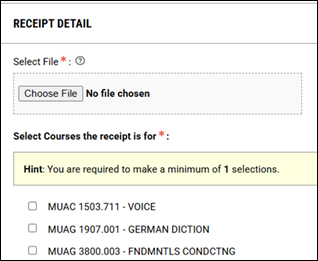
If you submit your request prior to the semester in which the course is, we will begin working on it. If you submit it right before the class begins or during the semester, we will require you to submit proof of ownership (such as a receipt) before beginning to work on it. We will always require proof of ownership to be on file regardless, before sending you the alternative format of your textbook.
Please keep in mind that depending on the format required and availability of accessing it from our online sources, this process may take some time. We encourage you to submit your request as soon as possible. If you are unable to upload something to AIM, please email us for further assistance at Books.ODA@unt.edu.